# 更换内核

### <mark style="color:blue;">Step 1：下载对应的Clash内核文件</mark>

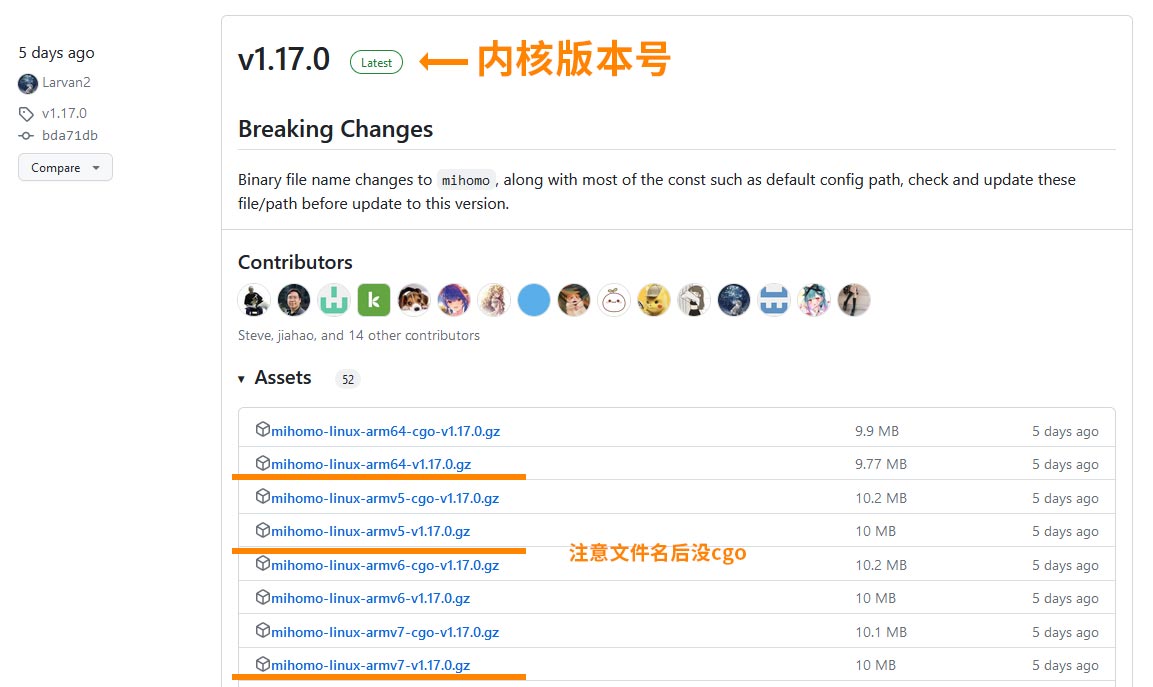
前往 <https://github.com/MetaCubeX/mihomo/releases> 下载最新的Clash内核文件；

<figure><img src="/files/032u2tbLxSdL5obbFDNL" alt=""><figcaption></figcaption></figure>

{% hint style="info" %}

* **ARM 64版本** 请使用 \*\*\*\*-linux-armv8/arm64.gz 预编译文件
* **ARM 32版本** 请使用 \*\*\*\*-linux-armv7.gz预编译文件
  {% endhint %}

### <mark style="color:blue;">Step2:压缩内核</mark>

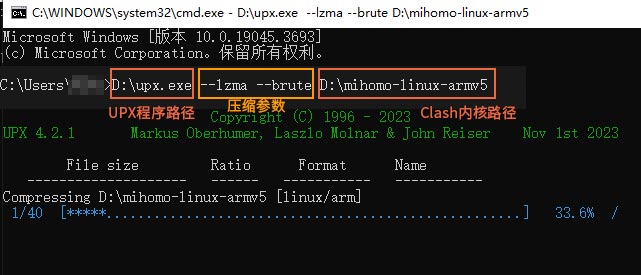
由于内核文件较大，路由JFFS空间容量有限，需要UPX压缩后才能放入\~

1..本教程以win64为例，下载下面的UPX程序

{% file src="/files/EBwXA6xFg15DKhTUdR8n" %}

3.下载解压UPX.zip压缩包里的UPX文件夹到任意位置

4.将刚下载的<mark style="color:orange;">mihomo-linux-armv\*.gz</mark>文件解压内部的二进制文件<mark style="color:orange;">mihomo-linux-armv\*</mark>到UPX文件夹，双击<mark style="color:orange;">upx all.bat</mark>等待UPX完成。

<div><figure><img src="/files/5xkJT7bF9Ey8unXkrWbA" alt=""><figcaption></figcaption></figure> <figure><img src="/files/g7unfhjjLf4sTDgofXSP" alt=""><figcaption></figcaption></figure></div>

### <mark style="color:blue;">Step3:上传新的内核到 MerlinClash</mark>

1.打开MerlinClash插件，点击 <mark style="color:blue;">**附加功能**</mark> 选项卡，找到 [**本地更换内核**](/mc/base/other-1.md#ben-di-geng-xin-nei-he)；

2.在 <mark style="color:blue;">**二进制上传**</mark> 处，选择 Mihomo，点击 <mark style="color:blue;">**浏览**</mark>，找到刚才 UPX后的文件，将其<mark style="color:orange;">重命名为clash</mark>，点击 <mark style="color:blue;">**上传二进制**</mark>；

3.等待日志提示成功，<mark style="color:blue;">**Enjoy\~**</mark>

<figure><img src="/files/JX3qLpRGbLc2MKlMpz4p" alt=""><figcaption></figcaption></figure>


---

# Agent Instructions: Querying This Documentation

If you need additional information that is not directly available in this page, you can query the documentation dynamically by asking a question.

Perform an HTTP GET request on the current page URL with the `ask` query parameter:

```
GET https://mcreadme.gitbook.io/mc/function/updatecore.md?ask=<question>
```

The question should be specific, self-contained, and written in natural language.
The response will contain a direct answer to the question and relevant excerpts and sources from the documentation.

Use this mechanism when the answer is not explicitly present in the current page, you need clarification or additional context, or you want to retrieve related documentation sections.